Getting MLS listings on your website is one of the smartest upgrades we can make to a real estate website. It helps us keep buyers on our site longer, create a stronger brand than third-party portals, and build a better lead generation system around property search, listing alerts, and showing requests.
But there’s a catch: adding MLS listings to a website is not just a matter of installing a plugin and hoping listings magically appear. We need the right permissions, the right MLS website integration method, the right setup for our site, and a clean display that actually works for users.
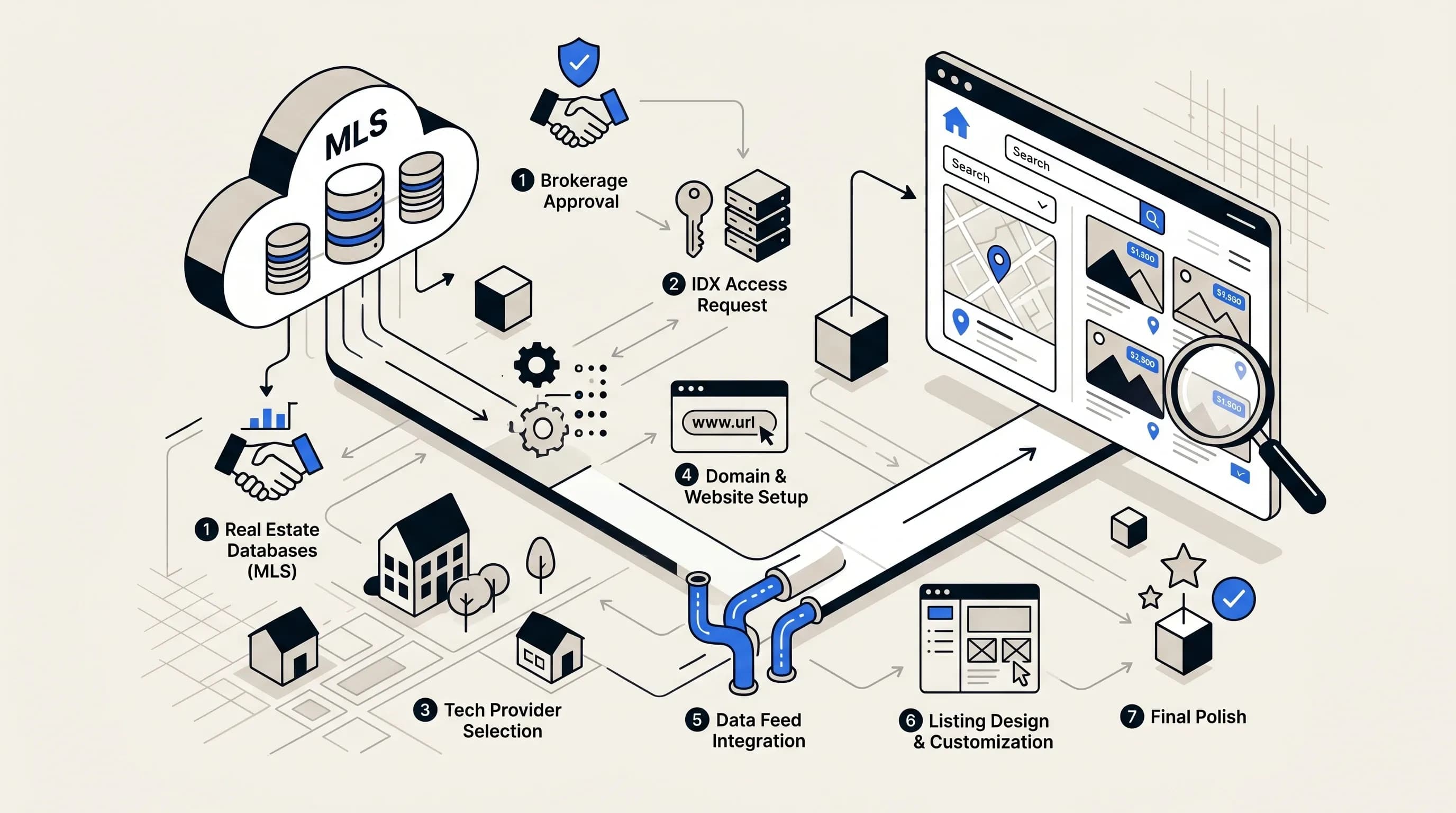
In this guide, we’ll walk through exactly how to get MLS listings on your website in 7 steps, including IDX, iframe, MLS API, RETS, RESO API, VOW, listing management, SEO, and practical tips that help a realtor website or brokerage website perform better after launch.
A real estate website without listings can still look professional, but a real estate agent website with searchable MLS listings is far more useful. Buyers want to browse homes now, not click away to Zillow or Realtor.com. Sellers want to see that we have a serious online presence. And we want visitors to stay in our ecosystem where we control the branding, the contact forms, and the next step.
Just remember that MLS data is controlled. Local MLS board rules, NAR-related requirements, broker approvals, compliance policies, and display restrictions all matter.
Before we think about IDX feed connection or MLS API integration, we need a website that can actually handle it. This sounds obvious, but it’s one of the biggest reasons people get stuck. If we don’t control the site, can’t install tools, or use a platform that doesn’t support the MLS solution we want, everything gets harder fast.
In many cases, the most flexible setup is a WordPress website where we have access to the admin area, plugin installation, theme settings, and page templates. That doesn’t mean WordPress is the only option, but it does mean we should confirm our platform works with our chosen IDX website integration or MLS feed for website setup.
Theme compatibility matters more than many people expect. Some MLS import tools only work properly with certain real estate themes. If a plugin is built around themes like Houzez, Real Homes, or WP Residence, using another theme may cause a situation where listings import in the background but don’t display correctly on the front end.
So before we touch MLS data, we should make sure the foundation is solid. A broken website theme can ruin an otherwise good MLS integration.
This is the step that trips up most people. We do not usually get live MLS listings on our website just by installing an IDX plugin or search widget. We need approved access to the MLS data first.
In general, that means we may need to be:
We also need to verify what type of display permission is available. In some markets, that means IDX. In others, there may be VOW rules, specific policies for sold data, disclaimer requirements, or restrictions on what can appear publicly.
If we’re using a modern API-first setup, we may receive credentials like a client ID, client secret, and server token. Without those credentials, even a perfectly built real estate website can show zero listings.
It’s also worth double-checking that we’re getting access to the correct local MLS. That sounds simple, but it’s one of the most important details in any MLS website integration project.
There are several ways to add MLS listings to your website. The right option depends on budget, speed, branding, SEO goals, and how much control we want over the user experience.
IDX, or Internet Data Exchange, is the most common way to display MLS listings on a realtor website. For many agents and brokers, it’s the easiest path to getting listing search live.
Why IDX is popular:
An iframe or simple widget can be one of the quickest ways to show MLS listings on your website. Some providers let us generate code and paste it into an HTML block to create an MLS Search page.
Pros:
Cons:
This can work as a starter solution if we mainly want searchable real estate listings without building a more advanced website database.
If we want more control, we can use a direct or semi-direct integration built around technologies like:
The newer RESO API standard is often the better long-term path than older RETS integration. It’s generally more modern, more flexible, easier to maintain, and better suited to custom websites and direct data ownership goals.
A more organic MLS integration can offer:
The tradeoff is complexity. API-based MLS integration usually requires a stronger developer or technical partner.
Once we know how we want to connect to MLS data, we need the right implementation partner. That may be an IDX vendor, an MLS-approved provider, a real estate website builder, or a custom developer.
If we go the plugin route, we need to remember something important: installation is not connection. Installing the tool is only the first part. We still need to authenticate the account, choose the MLS, add the credentials, and confirm the feed is active.
We also need to make sure we use the exact account information provided by the vendor or MLS. In some cases, the username is not our email address, and a tiny mismatch can stop the MLS feed from connecting.
This is where the project starts becoming real. Once our tool is installed, we need to connect it to the MLS data source and configure how listings will import or display.
For many WordPress-based solutions, that includes:
Ideally, we want two successful confirmations:
If only the first part works, the issue is usually one of these:
After connection, many systems show a field selection screen. This is where we decide what MLS data actually gets imported or displayed. That may include fields like:
Usually we can control:
This matters because many real estate themes rely on specific internal field structures for search, filters, property details, sorting, and listing IDs. If we map poorly, the site may look incomplete or behave unpredictably.
Our rule of thumb should be simple: keep mandatory fields, include the fields buyers actually care about, label them clearly, and hide anything internal or messy.
Once the connection is working, we need to define what gets pulled into the site or displayed to visitors. In some systems, this means setting up import tasks. In others, it means configuring search widgets, page templates, or listing display options.
If possible, we recommend testing with a small batch first instead of importing everything at once. A small import is easier to review, easier to troubleshoot, and much safer if field mapping or theme display isn’t perfect yet.
Large imports can also strain a server. Instead of pulling everything in one giant task, we can split imports by city, price range, office, or property type.
One overlooked detail is title formatting. If different import tasks create different title structures, the site gets messy fast. We should choose one consistent format, such as:
Consistency helps with organization, updates, and overall listing management.
Even if listings are imported directly into WordPress, we should still build a clear page like:
If we’re using an embed or widget approach, this is where the code usually goes. It should also be easy to find in the main navigation.
Once the first listings appear, the job isn’t done. We need ongoing sync so the website stays current with new listings, status changes, price changes, edits, and removals.
Most systems offer automatic updates every hour or on another regular schedule. This is essential for trust, compliance, and user experience.
If the listings don’t appear, the problem is often technical and fixable. Common causes include:
If needed, we should contact MLS support or provider support with the MLS number and ask them to trace the listing.
There’s one rule that can save a lot of headaches: a listing can usually only be imported once. If one import task already brought a listing into the site, another task may not be able to import it again.
So if we change strategies from office-based imports to agent-based imports, we may need to remove the old imported listings first and then reimport cleanly. Otherwise, it can look like the new tasks are broken when they really aren’t.
Incomplete listings are weaker listings. If buyers search by pool, garage spaces, school district, community name, waterfront, or property type, and those fields are left blank, the listing may never appear in filtered search results.
Each field is both a data point and a discoverability signal. Even optional fields can improve listing search visibility and user experience.
Just because a field exists does not mean we should show it. People care about price, photos, beds, baths, square footage, schools, taxes, HOA fee, neighborhood, and standout features. They do not care about ugly backend field names or cluttered admin-only data.
Use front-end labels to rename awkward fields, such as changing AssociationFee to HOA Fee, and keep internal notes hidden from public view.
Photos still carry the listing, but floor plans and virtual tours make property pages much more useful. Buyers often spend more time on listings with floor plans because they can understand how the home actually flows. That improves engagement and can help qualified buyers move faster.
If available, add:
Do not upload listing photos randomly. Start with a strong hero image, then move through the home in a sequence that makes sense. A simple walkthrough order works well: exterior, entry, living spaces, kitchen, bedrooms, bathrooms, and outdoor areas.
This helps buyers understand the layout instead of just flipping through disconnected images.
Most property search happens on phones. We should test the actual MLS search, not just assume the theme is mobile-friendly. Filters, map search, listing detail pages, galleries, contact forms, and saved search tools all need to work smoothly on smaller screens.
The best MLS website integration is not just about displaying data. It’s about turning traffic into leads. We should include:
Some buyers also love map drawing tools, property sharing, and personalized alerts. If our provider supports those features, they’re worth using.
Status changes like active, contingent, pending, active under contract, and sold should be updated promptly. Delays create bad user experience, wasted showing requests, confusion for buyers, and possible compliance problems.
We should monitor:
If a listing gets traffic but few inquiries, we should review the pricing, photos, floor plan, or presentation. If a page gets no traffic, we should improve SEO, internal linking, and promotion.
MLS integration alone does not guarantee search visibility. Many IDX pages are templated, and some are externally hosted. That’s why we need supporting content and strong real estate SEO around the listing search experience.
Use location-based terms buyers actually search for, such as:
These pages help us build organic visibility around the property listings instead of relying only on the MLS feed.
If we want to get MLS listings on our website successfully, we need to think of the project in four parts: the right website setup, the right MLS permissions, the right data mapping, and the right display rules. Once those are aligned, the process becomes much more manageable.
For many real estate professionals, the simplest path is an IDX feed. For quick setup, an iframe or search widget may be enough. For long-term flexibility and deeper control, MLS API or RESO API integration is often the stronger option.
Whichever route we choose, the real goal is not just to put MLS listings on a website. It’s to build a mobile-friendly, searchable, branded real estate website that keeps users on our site, supports SEO, improves listing management, and converts visitors into clients.
Our best advice is to start small, test with a limited set of listings, make sure the layout and mapping are correct, and then scale up. That approach is much easier than importing everything at once and trying to untangle a mess later.

Hey, in Propphy we're determined to make a business grow. My only question is, will it be yours?
It's totally free, with no commitments
Hey, in Propphy we're determined to make a business grow. My only question is, will it be yours?
It's totally free, with no commitments